テーマ(Theme)

NovelAI には 19 種類の既定テーマと、配色やフォントを自由に変えられる Theme Editor があります。見やすさ・好みに合わせて調整しましょう。
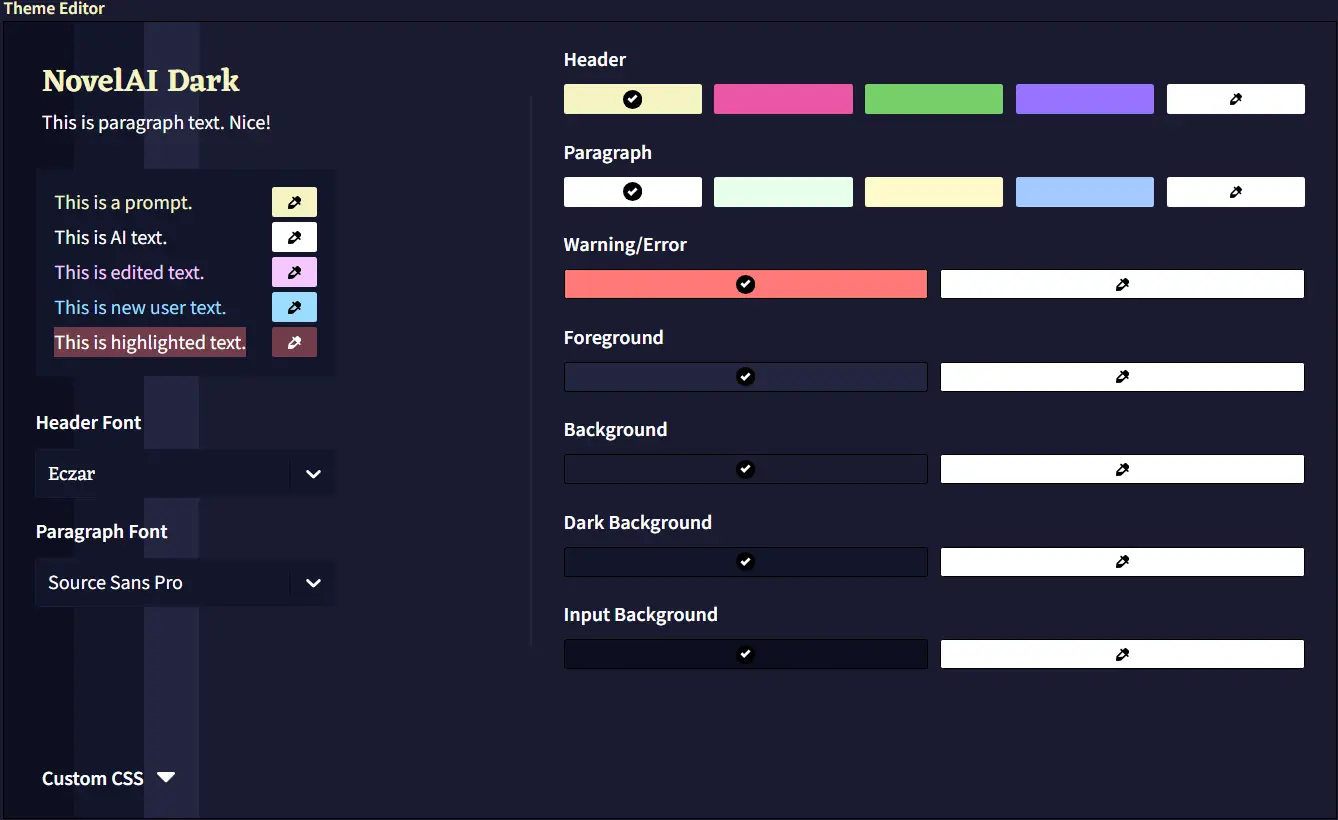
色を変えるとエディター背景もプレビュー的に変わります。各要素の右にあるカラーピッカーで細かく調整可能です。

編集後は必ず適用・保存してください。テーマは .naitheme で入出力できます。共有はコミュニティ(Anlatan Discord の novelai-content-sharing)でも盛んです。

Custom CSS でさらに細かいカスタマイズも可能です(更新で壊れる可能性はあります)。もし崩れたら Alt+Shift+P で既定テーマに戻せます。以下は例です。

カスタム HypeBot
.comment-avatar-box {
    background-image: url(https://i.imgur.com/fPwZIbN.jpg);
}
.comment-avatar {
    background-image: url(https://i.imgur.com/hvb1a4i.png) !important;
    background-color: transparent !important;
}
.comment-arrow {
    opacity: 0.0 !important;
}
.comment-avatar-box は背景、.comment-avatar は待機中のアバターです(GIF も可)。
.comment-avatar-speaking-active {
    background-image: url(https://i.imgur.com/FqSGMHE.gif) !important;
}
発話中に表示される画像。
.comment-avatar-thinking {
    background-image: url(https://i.imgur.com/CrCTvlu.png) !important;
}
思考中に表示される画像。
.comment-avatar-idle {
    background-image: url(https://i.imgur.com/hvb1a4i.png) !important;
}
発話後の待機画像。
.comment-name::after {
    content: 'Nai-chan' !important;
}
HypeBot の表示名を変更します。
全体像は以下のようになります。
.comment-avatar-box {
    background-image: url(https://i.imgur.com/fPwZIbN.jpg);
}
.comment-avatar {
    background-image: url(https://i.imgur.com/hvb1a4i.png) !important;
    background-color: transparent !important;
}
.comment-arrow{
    opacity: 0.0 !important;
}
.comment-avatar-speaking-active {
    background-image: url(https://i.imgur.com/FqSGMHE.gif) !important;
}
.comment-avatar-thinking {
    background-image: url(https://i.imgur.com/CrCTvlu.png) !important;
}
.comment-avatar-idle{
    background-image: url(https://i.imgur.com/hvb1a4i.png) !important;
}
.comment-name::after {
    content: 'Nai-chan' !important;
} |
 |
 |

背景画像
#app {
    background-image: url(https://i.imgur.com/2Xt07Ut.jpg);
    background-size: cover;
    background-position: center;
}
透過背景
.menubar, .infobar, .conversation, .module-trainer {
    background-color: #0c0c1088 !important;
    backdrop-filter: blur(5px);
}背景をうっすら透かす例。backdrop-filter でぼかし具合を調整できます。
枠線を消す
* {
    border: none !important;
    outline: none !important;
}各所の境界線をまとめて非表示にします(* は必須)。